Episode 38 - Saved by Zero
Welcome to the show
Published: November 2nd, 2026
Tod and Paul share a new AI CAD service, a $70 hackable synth, KiCad in the browser, and more.
Follow the show on Bluesky. Follow Paul on Bluesky or Mastodon and Tod on Bluesky and Mastodon.
Support the show! Join the Supporter tier and get early access to episodes, exclusive content, and more. Visit TheBootloader.net/support to learn more.
Come hang out with the community in our Discord channel. Go behind the scenes or chat about the latest episodes with Paul, Tod, and other community members.
We will be hosting a live stream on Discord on Wednesday, November 18th at 7:30 p.m. EST / 4:30 p.m. PST. We hope to see you there!
Listen to the podcast
Transcript
Full transcript available here.
Show Notes
00:23 PartForge AI (Paul #1)
PartForge.AI is a new service that uses AI prompts to design 3D parts. You can use natural language to describe the part you want to design, or upload a photo, sketch or 3D file.
It has a free plan or plans start at $20 / month or you can bring your own API key from your AI service of your choosing. I designed one part with one prompt and probably 3 or 4 more edits, and it used about 40% of my session usage and 30% of my weekly usage.
Once the part is designed, PartForge makes it easy to edit, either by using natural language or by the sliders available to edit the project. There are sliders for the width, depth, wall thickness, and more. You can view and spin it from all angles just like using a normal CAD program. This is one of the reason they call projects forges - just like a real forge, you change it or edit it.
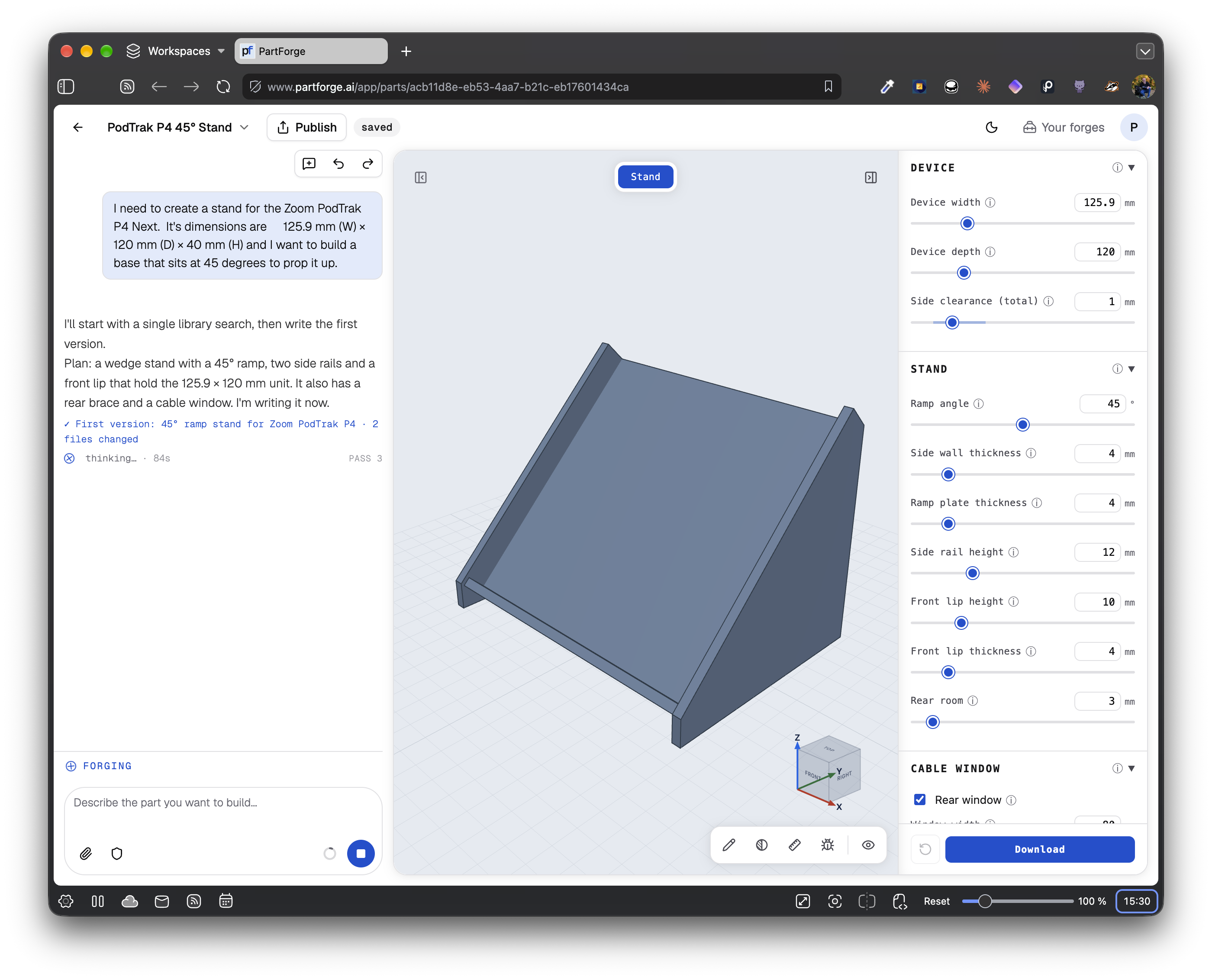
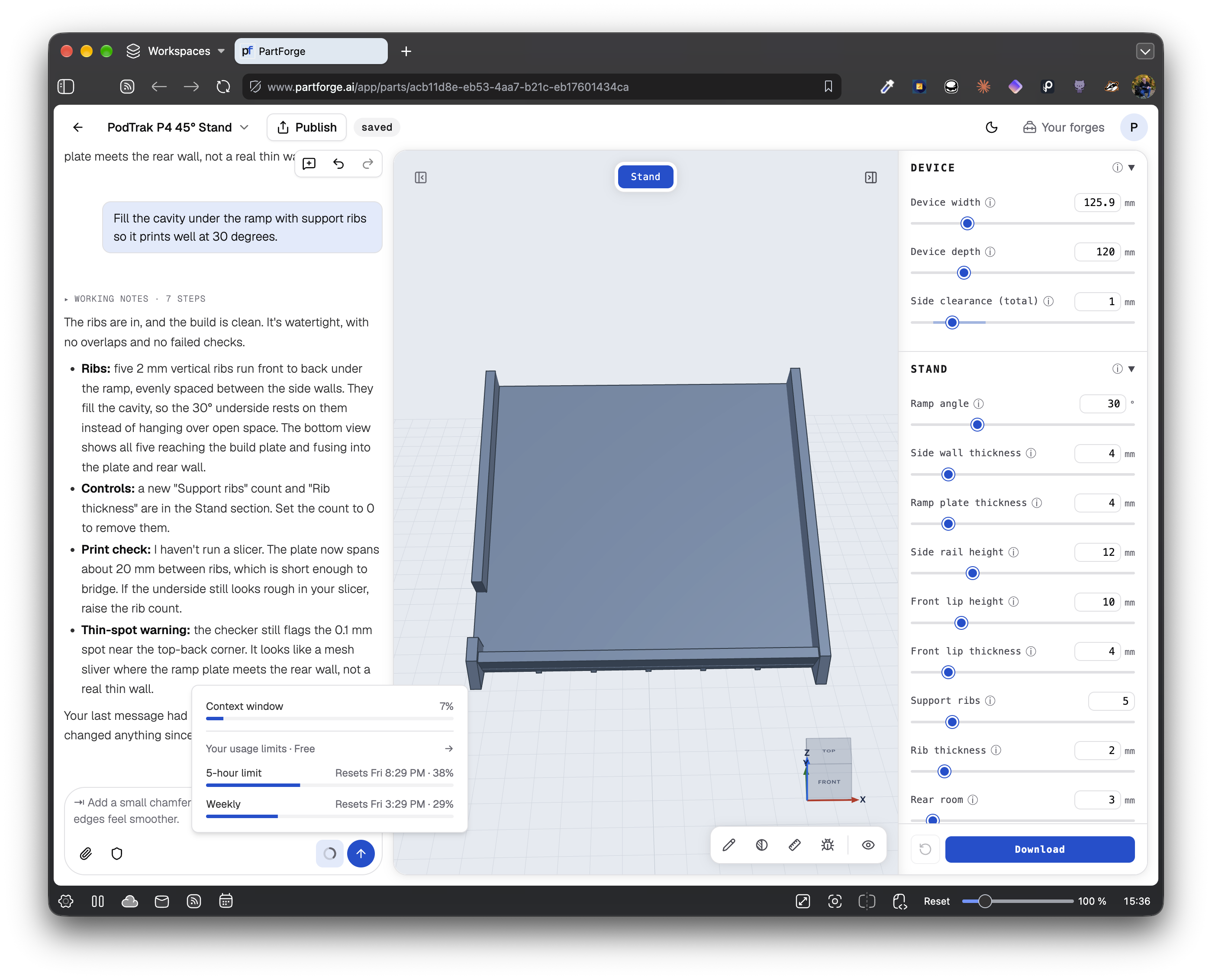
One of the things that was impressive is the recommendations it makes, such as adding a lip to the holder I was designing, or using a chamfer to round the edges. It even reminded me to add a cutout for the USB-C power cable that I forgot.
It outputs the design in STEP, STL, or 3MF and prompts you to use a license, including all rights reservered or more open licenses like MIT or Creative Commons. It also creates a GitHub repository you (or other depending on your license) can check out that has Javascript files with the details of the forge.
- PartForge AI
- Ellen Shapiro's Mastodon post sharing PartForge
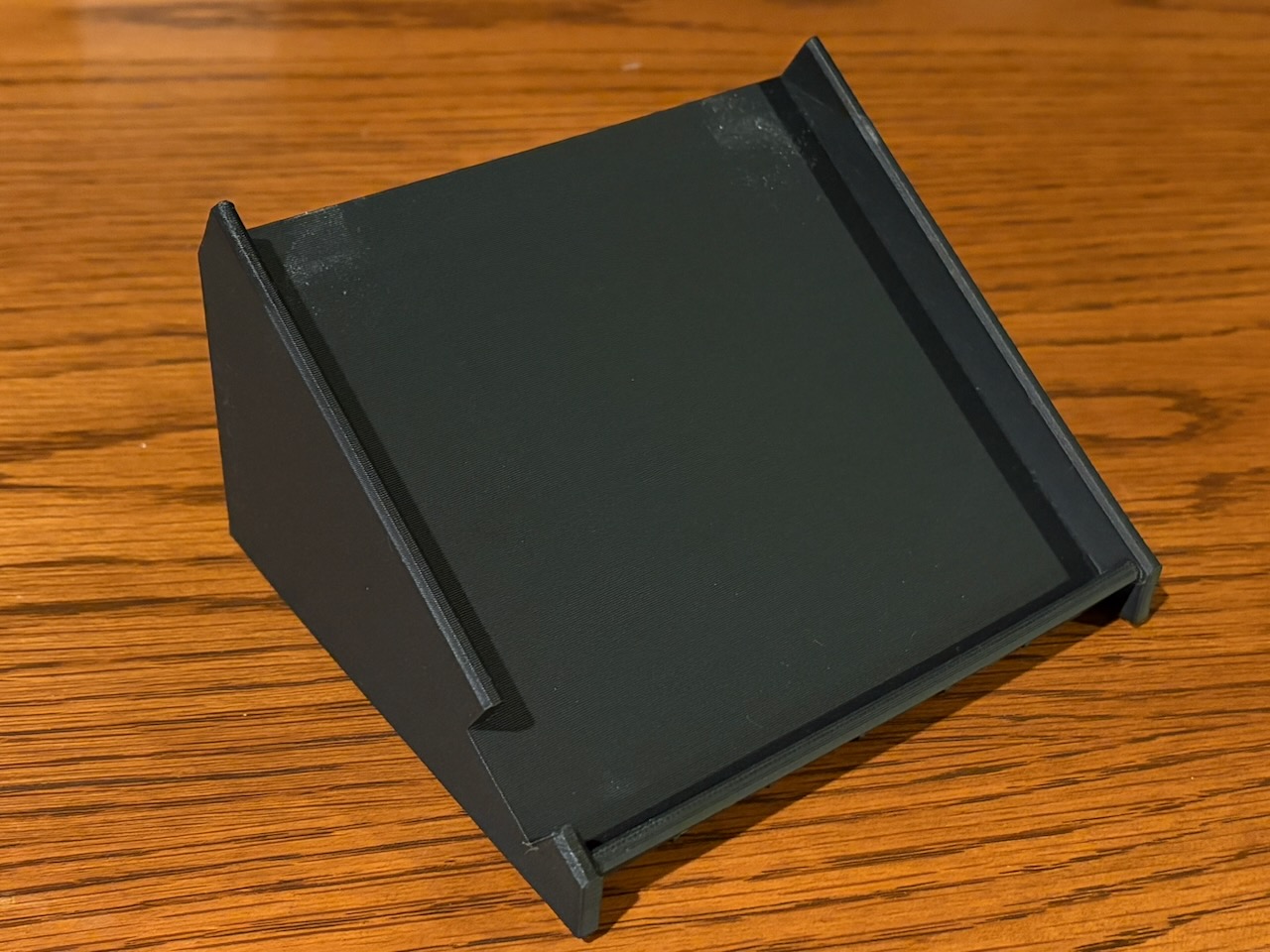
- Paul's first project - a stand for the Podtrak P4 Next
- PartForge model evaluations
7:14 M-VAVE FM-1 synth and custom firmwares (Tod #1)
Oh no another tiny synth toy, the M-VAVE FM-1. And you may've even heard about this one, as it's been blowing into other hacker/maker forums because of what people are doing with it. The FM-1 is a handheld, battery-powered synth with a 27-key silicone piano-like keyboard and 8 knobs and a nice color TFT display and BLE. It came out about three months ago. It's designed as an "FM" synth, meaning it sounds like the venerable Yamaha DX-7 and can even load DX-7 patches. All this for only $70. And then hackers got to it.
People wondered if the FM-1 was running "Dexed", an efficient open-source emulation of the original DX-7. (There's even PicoDexed, a Dexed for the Pico) A week or so after it came out, hackers started poking around the FM-1's firmware update file and found it was indeed using Dexed. And then the reverse engineering really begun. We learned the chip in the FM-1 was a JieLi AC791N, a 320 MHz dual-core RISC CPU that was evolved from a copy of a Blackfin DSP from the early 2000s but has grown in functionlity towards working like modern ARM cores. The chip devkit likely used to develop the FM-1 was found on AliExpress, so devs could hack on a fully open board. The various bootloader modes were discovered, as well as the complete pinout for all the buttons, knobs, LCD, audio codec, etc. All of this documented in the open on various github repos.
As this was happening, someone named "Baud girl" released FM-1+VA, a complete alternate firmware for the FM-1 that turned it into a virtual analog synth with a beautiful UI, a great sequencer, and sounded great. Suddenly your little $70 toy could be something totally new! And you could go back to the stock firmware at any time.
A week or so after that, the first open source custom firmwares for the FM-1 started showing up, like the Felucca firmware), which turned the FM-1 into a 4-track groovebox with 13 different synth engines. Or Sloop, another groovebox that looks & works much like the Teenage Engineering OP synths. (Don't spend $1200 on an OP-1, spend $70 and use Sloop!) The fascinating thing about all these is they not only included a web installer for the firmware, but also included a web-based emulator of the FM-1 with that firmware so you could try the firmware out online.
The /r/MVaveFM1 subreddit started having daily posts of new firmware. People were sharing code and compilation tricks, creating new firmwares based on existing ones, making the provenance of where an idea came from a little dizzying. In response, websites popped up to manage the flood: an atlas of firmware or an online meta firmware catalog & installer. It became a joke on the various synth sub-reddits that we don't need any new synths because there will just be another FM-1 firware that has those features.
Almost all of the the firmware work is vibe coded, and proudly so. It's enabled those who know barely enough, but have an idea, to realize that idea and scratch their particular itch. So now we have Ghoulbox dungeon synth firmware, a fork of Felucca that is "tuned for dark ambient, medieval and fantasy synth music, from Old Tower and Hole Dweller to Mortiis-era dungeon synths".
It appears much of the reverse engineering was done with the help of AI too. The particular JieLab chips have very little open documenatation and what does exist is in Chinese. I think the original reversing efforts were done in China, so they probably found it easier going, but being able to dissassemble a firmware image file and find out the audio codec routines is the kind of thing that used to take months. Now we can do it in a weekend. It's incredible how fast the reverse engineering happened, and its completeness.
So the FM-1 is pretty fun, and custom firmwares have made it even more so. As someone who's written synth software for many years, I'm pleased to see many of the well-known algorithms for doing synthesis all combined in one place to make comparison easier. These firmwares become almost an archive of music DSP code.
Watching the reverse engineering efforts in near real-time has been a blast. I think what's going on with the FM-1 is a bellwether of things to come. Thanks to these new AI systems, all hardware is pretty open now, even if the manufacturer doesn't want it to be. For customers this increases our ability to customize and repair the products we own and that's a good thing. Companies will have to figure out how to deal with this going forward. M-Vave, the company that makes the FM-1, is responding well, releasing their own open source custom firmware and having an official rep join the MVaveFM1 subreddit. They're seeing what's going on and how interest in the FM-1 has exploded because of this new-found openness.
If you've got $70 burning a hole in your pocket and want to replace that with a little synth you can install over 100 different synths on, I say get an FM-1.
Links:
- M-VAVE FM-1 home page
- PicoDexed
- Reverse Engineering of the M-VAVE FM-1
- BaudGirl FM-1+VA firmware
- Felucca firmware
- FM1 Open by M-Vave
- The FM-1 Firmware Hub
14:40 Sprout Pi for Classic iPods (Paul #2)
Do you own an original iPod or iPod mini? The Sprout Pi Mainboard is a drop in replacement mainboard for iPod 3rd or 4th generation or iPod mini - no soldering required.
Sprout Pi replaces the logic board, runs new software, and includes new features, such as:
- Wi-Fi
- Bluetooth
- Hi-Fi DAC
- USB-C charging
- MicroSD card that can hold up to 2TB of music
- AirPlay and Google Cast
There are two versions, Sprout Pi and Sprout Pico. The former uses a Raspberry Pi Compute Module Zero and the Sprout Pico uses an rp2350.
Sprout is also open source - both the hardware and software. Schematics, board layouts, and the bill of material are licensed under CERN-OHL-S v2. Firmware and software and the Sprout Pi runtime are licensed under MPL-2.0. Documentation, including reverse-engineering notes on the iPod display, click wheel, and headphone connectors, are licensed under CC-BY-4.0.
18:21 ZiroDesigner : KiCad in the browser (Tod #2)
KiCad in the browser!?! That's unpossible! If you use KiCad to make schematics and PCBs, you've likely used KiCanvas by Thea Flowers, an open source web viewer for KiCad schematics and PCBs. Just paste a github link into KiCanvas and view a semantically-linked graphical PCB & schematic view in your browser. It's incredibly handy for sharing and showing KiCad designs without needing to install anything on your computer. Now, you can have the entirety of KiCad in your browser with ZiroEDA (that's Z-I-R-O EDA). What the heck? In short: they vibe-coded a port from C++ to Typescript of all of KiCad source code. And it seems to work.
If you use KiCad regularly, I say go try ZiroEDA right now and be a bit flabbergasted and how it's just KiCad-in-the-browser. Everything seems to work as in the real app. It's almost anti-climactic. "Yup, that's KiCad".
The ZiroEDA project is up on github and GPL licensed. And they're very quick to note that "ZiroEDA extends the KiCad ecosystem; it does not replace KiCad" and it's not a fork of KiCad. They include a PHILOSOPHY.md file designed as much for humans as LLMs, describing in detail how the project is a complement to KiCad and not a replacement.
Unfortunately the people behind ZiroEDA are unnamed on their homepage but are affiliated with IIT Madras Nirmaan, an incubator that's part of the Indian Institute of Technology Madras. The commit logs show it's almost exclusively Akshay Rukade (UHK-shay ROO-kuh-day) and Claude as committers. Hi Akshay! Thanks for ZiroEDA!
Note that if you use the ZiroEDA website, you'll be encouraged to create an account. You don't need this. You can create and edit entirely anonymously. Creating an account does give you access to their their cloud storage for saving. And of course it's not required if you're browsing github-based KiCad projects.
I find ZiroEDA fascninating and fun to use, but I wouldn't trust it yet for anything critical. Think of it more like a fancy version of KiCanvas where you could do edits. For my work, I use a lot of 3D models in my visualization (btw the 3D viewer works great in ZiroEDA) and I don't want to figure out the process of getting all those models up on to ZiroEDA. But it is pretty amazing to be able to do some quick schematics in a browser without disturbing my current KiCad setup. It'll be interesting to see if this goes anywhere. I've noticed several of these big vibe-coded projects make a big splash but then go unmaintained as time goes on. Here's hoping that ZiroEDA sticks with us.
Thanks Paul for pointing me at ZiroEDA and there's also a good article on Hackaday about it.
22:27 DVinyl (Paul #3)
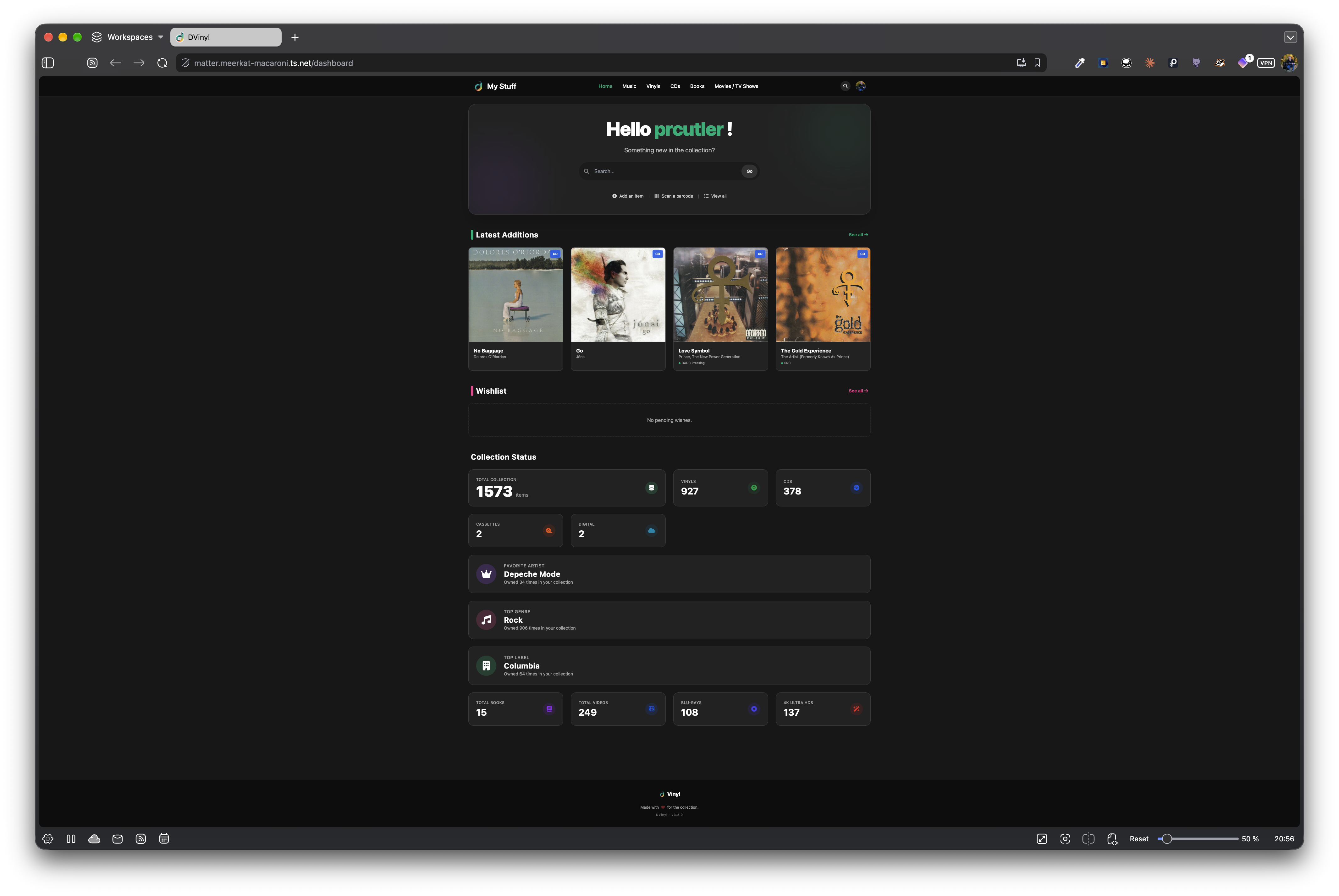
DVinyl is a new web app that uses Docker to help you catalog your music, movies, books, games, or LEGO collections. If you can get it installed with an SSL certificate, you can even scan a UPC from your phone to add an item to your collection. It also can import your collections from Discogs, Hardcover, and more.
When you add an item, you can choose whether it's a paperback or hardcover if it's a book, for music you can choose from cassettes, vinyl records, and CDs, and for movies you can choose from DVD, Blu-Ray, VHS, or 4K Blu-Ray.
It has a well designed UI and makes it easy to add items, see your collection stats at a glance, and more.
28:17 SketchingPad BLE/USB Macropad (Tod #3)
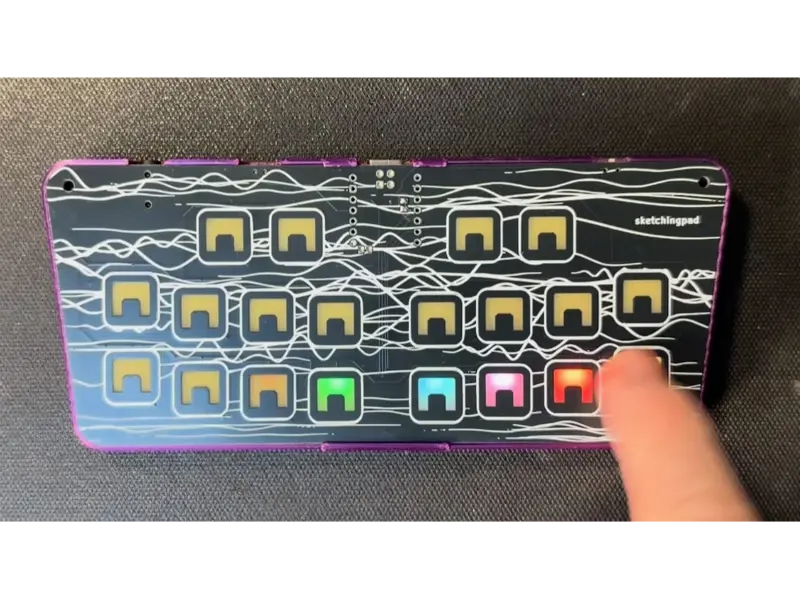
I created another weird thing. And you can pre-order it on SmallRun.net. It's a 20-key touch USB/BLE macropad with per-key RGB backlighting, useful as a keyboard, MIDI controller, gamepad and more. I made it as a present to everyone at the Sketching in Hardware conference. It's about the size of a gamepad, with 10 keys on each half in sort of a "wing" pattern. The top surface is the PCB with the touch surface and the clip-on 3d printed case has a small tilt to it so it looks keyboard-like on a desk. I like the result! It looks both playful and weird but also a little useful.
At the conference I had a "sketchingpad party" Arduino app running on it that let anyone draw color patterns on their pad and that pattern was echoed on everyone else's pad. No setup, just play! It was fun.
This was the 20th year of doing Sketching in Hardware, I wanted a present that reflected that "20" and was about sharing and technology. The original design goal was something with capacitive touch because I've been into that so much. And something wireless to "share" something. Beyond that, what was it? I really liked being able to just "strum" my fingers across the surface of the captouch grid controllers I've made, watching the LED trails emerge from my finger tips. That's a nice effect. And shareable; we could send each other color patterns, maybe. So I made that the physical design of the "Sketching gizmo": a 20-key captouch keyboard with RGB backlit keys.
But how to do "sharing" of these color patterns? I wanted no configuration, no joining an AP, no pairing, just pick up the pad and draw. I tried ESP-NOW (the no-config connectionless WiFi protocol ESP32s can do), but even with the most conservative power modes, I found the ESP32 too power hungry for a small keyboard-like board. Thankfully, the nRF52840 BLE chip does native USB (so can also be a USB keyboard/gamepad, post conference) and draws only about 5 mA when running full out, even less when put into various power-save states. Seeed makes the tiny XIAO nRF52840, which makes board complexity go way down. Use it and the MCU sub-circuit is done.
Okay but how to do this "no setup" color pattern sharing with BLE? I gave a talk about abusing the BLE advertising packet for transmitting arbitrary data at Sketching in Hardware in 2014. Let's ressurrect that! The BLE advertising packet is what your BLE devices emit when they're in pairing mode. It has 25 bytes you can use for whatever you want. So I created an LED animation event list that stores the colors and times of a pattern, then a animation message format that can store multiple of these events in an advertising packet. The sender then just records an animation, packages it up as a series of messages and broadcasts them in that packet. The recievers listen and reassemble the animation. And it works! Abusing protocols for the win!
Another of my other design goals was as little assembly work as possible for me. I wanted the whole PCB to be low-complexity and inexpensive, using JLC SMD PCBA capabilities as much as possible. Let their robots solder upmost all the parts. I could do light hand-soldering at the end maybe. The XIAO boards aren't stocked by JLC normally, so I'd have to at least solder them down myself.
Oh but wait, how to do the 20 RGB LEDs? That's 60 LEDs really. I wanted full brightness control over all of them so I could do cool fades. The neat charlieplex chips by ISSI can drive 144 single color LEDs or 32 RGB LEDs. It's got great brightness control and power manangement that would make it perfect for low-power use. Unfortunately, the complexity of the wiring was too much. Because the PCB has these huge no-go areas where the touchpads are, the actual routable area for traces was quite low. So I took the naive approach I've done before of using side-firing SK6812s. They're Neopixel compatible, and I found a newer version that draws only a 0.25 mA when dark. This is still a lot for 20 LEDs, but with a little transistor switch on the LED power bus, I can turn off the LEDs to save power.
For doing the captouch sensing, I'm a big fan of this weird little TS20 touch chip.
I found it on LCSC. It has 20 inputs, (and 20 years of Sketching! seems like a fateful match), is only $1, works great, and is always in stock at LCSC.
So I finalized the design, did a test fab of 5, they worked great,
and set to ordering the big order... only to discover the TS20 was out of stock!
And wouldn't be back in stock until the conference.
Out of stock! It's never out of stock!
I allowed myself to freak out for an hour and then redesigned the board
to use two MPR121 12-channel touch chips. I didn't have time for a test fab,
so submitted the redesign as the big order AND also the original TS20 version
at the same time, but without the TS20 soldered.
I figured, if the MPR version didin't work, I had TS20 chips on hand I could
maybe have enough time to solder them by hand. They're annoying to solder though.
While I was waiting for the boards, I polished up the software, adding some more useful examples beyond my weird sketchingpad_party app. In the sketchingpad github repo you can find Arduino examples for a BLE keyboard, BLE/USB MIDI controller, and more. I'll be adding to it over the next few weeks. I also have CircuitPython examples, with similar applications. Most of the apps are in Arduino because in Arduino I can get to the lower power modes of the nRF52 that CircuitPython doesn't expose.
To make installing these easier, there's a little sketchingpad web flasher page that works on any browser with WebSerial. I wanted attendees to not have to download the entire Arduino IDE to reflash their boards.
And when the big box of boards finally arrived, I was relieved to find the MPR-based boards worked great. But now I have a bunch of TS20-based boards will work great when I get time to solder down those TS20 chips. So guess what's going in the store? If you're interested in one, check out the SmallRun.net page or poke me on the socials about it.
38:10 Wrap-up and Livestream information
Join our Discord server for our monthly livestream on Wednesday, November 18th at 7:30 p.m. EST / 4:30 p.m. EST. We’ll chat about the latest episode, stories that almost made it on the show, and what we’re up to. Hope to see you there!